
2025年12月より、JSTQB Advanced Level テストマネージャ試験は「テストマネジメント試験」へとリニューアルされました。この試験に挑むエンジニアを悩ませるのが、「市販の問題集が存在しない」という過酷な現実です。
前回の記事では学習戦略をお伝えしましたが、今回はその学習を支えた最強の相棒、自作のクイズアプリ(PySide6版)の構築方法と、確実に配布用ファイル(exe)を作る手順を公開します。
本記事の対象読者
・JSTQBやIPAなどの資格試験を控え、効率的な学習環境を自作したい方
・Python(PySide6)で、実用レベルのデスクトップアプリを作ってみたい方
・「やる気」に頼らず、仕組みで合格を勝ち取りたいエンジニア
1.【準備】Pythonのインストールと環境構築
まず、アプリを動かすための土台となるPythonをインストールします。ここでは、初心者が最もつまずきやすい「PATHの設定」を確実にクリアしましょう。
Windowsでのインストール手順
1.公式サイトからダウンロード: python.org にアクセスし、最新版をダウンロードします。
2.【最重要】チェックを入れてインストール:
•インストーラーを起動した直後の画面下部にある 「Add Python 3.x to PATH」に必ずチェック を入れてください。
•これにチェックを入れないと、コマンドが認識されず、後のステップでつまずきます。
3.ライブラリの一括導入:
•インストール完了後、コマンドプロンプトを開き、以下を実行してください。
pip install PySide6 pyinstaller2. ステップ1:問題データ(CSV)の用意
問題集がない以上、シラバスやサンプル問題をデータ化する必要があります。以下のヘッダーを持つCSV(questions.csv)を作成します。
CSVフォーマット:
id,question,a,b,c,d,answer,explanation💡 AI活用のコツ
ChatGPTやGeminiなどのAIにサンプル問題を渡し、「上記ヘッダーのCSV形式に変換して。カンマは適切にダブルクォーテーションで囲んで」と依頼すれば、数秒でデータが完成します。
なお、コード内では utf-8-sig で読み込むよう実装されています 。これによりExcelで作成したCSVも扱えますが、「メモ帳」などでCSVを作成すると文字化けする可能性があります。また、Excelで保存する際はCSV(コンマ区切り)形式を選んでください。
3.ステップ2:PySide6によるアプリ実装
以下のコードを app.py として保存してください。エラーハンドリングと操作性にこだわった構成です。
# -*- coding: utf-8 -*-
import sys, os, csv, random, datetime, logging
from pathlib import Path
from dataclasses import dataclass
from typing import List, Dict
from PySide6.QtCore import Qt
from PySide6.QtWidgets import (
QApplication, QMainWindow, QWidget, QFileDialog, QMessageBox, QLabel, QPushButton,
QVBoxLayout, QHBoxLayout, QListWidget, QListWidgetItem, QSplitter, QGroupBox,
QCheckBox, QTextBrowser, QToolBar, QStatusBar
)
# ---------- 基本設定 ----------
def get_base_dir() -> Path:
if getattr(sys, "frozen", False):
return Path(sys.executable).resolve().parent
return Path(__file__).resolve().parent
BASE_DIR = get_base_dir()
RESULTS_DIR = BASE_DIR / "results"
LOG_DIR = BASE_DIR / "logs"
for d in (RESULTS_DIR, LOG_DIR):
d.mkdir(parents=True, exist_ok=True)
log_path = LOG_DIR / "app.log"
logging.basicConfig(filename=str(log_path), level=logging.INFO,
format="%(asctime)s [%(levelname)s] %(message)s")
logger = logging.getLogger("quizapp")
logger.info("=== Quiz App Start (Simple Version) ===")
# ---------- データ構造 ----------
@dataclass
class Question:
id: str
question: str
choices: list # 4つの選択肢
answer_index: int # 0-3
explanation: str = ""
def parse_csv(path: Path) -> List[Question]:
"""CSVファイルから問題を読み込む"""
questions = []
errors = []
try:
with open(path, encoding="utf-8-sig", newline="") as f:
reader = csv.DictReader(f)
line_no = 1
for row in reader:
line_no += 1
try:
qid = (row.get("id") or f"q{line_no}").strip()
qtext = (row.get("question") or "").strip()
a = (row.get("a") or "").strip()
b = (row.get("b") or "").strip()
c = (row.get("c") or "").strip()
d = (row.get("d") or "").strip()
ans = (row.get("answer") or "").strip().lower()
explanation = (row.get("explanation") or "").strip()
# バリデーション
if not qtext:
errors.append((line_no, qid, "問題文が空"))
continue
if not all([a, b, c, d]):
errors.append((line_no, qid, "選択肢が不足"))
continue
if not ans:
errors.append((line_no, qid, "正解が未設定"))
continue
# 正解インデックスの変換
if ans in ["a", "b", "c", "d"]:
idx = ["a", "b", "c", "d"].index(ans)
elif ans in ["1", "2", "3", "4"]:
idx = int(ans) - 1
else:
errors.append((line_no, qid, "正解は a-d または 1-4 で指定"))
continue
questions.append(Question(qid, qtext, [a, b, c, d], idx, explanation))
except Exception as e:
errors.append((line_no, row.get("id", "?"), f"エラー: {e}"))
except Exception as e:
logger.error(f"CSV読み込みエラー: {e}")
raise
# エラーレポート
if errors:
logger.warning(f"読み込みスキップ: {len(errors)}行")
for line_no, qid, reason in errors:
logger.warning(f" 行{line_no} ({qid}): {reason}")
logger.info(f"問題読み込み完了: {len(questions)}問")
return questions
# ---------- 開始画面 ----------
class StartPanel(QWidget):
def __init__(self, app):
super().__init__()
self.app = app
layout = QVBoxLayout(self)
# CSVファイル選択
file_group = QGroupBox("問題ファイル")
file_layout = QHBoxLayout()
self.file_label = QLabel("CSVファイルを選択してください")
self.btn_browse = QPushButton("ファイルを選択...")
self.btn_browse.clicked.connect(self.browse_csv)
file_layout.addWidget(self.file_label, 1)
file_layout.addWidget(self.btn_browse)
file_group.setLayout(file_layout)
# オプション
option_group = QGroupBox("オプション")
option_layout = QVBoxLayout()
self.chk_shuffle = QCheckBox("選択肢をシャッフルする")
self.chk_shuffle.setChecked(True)
option_layout.addWidget(self.chk_shuffle)
option_group.setLayout(option_layout)
# 出題設定
start_group = QGroupBox("出題設定")
start_layout = QHBoxLayout()
btn_10 = QPushButton("10問")
btn_25 = QPushButton("25問")
btn_all = QPushButton("全問")
btn_10.clicked.connect(lambda: self.start_quiz(10))
btn_25.clicked.connect(lambda: self.start_quiz(25))
btn_all.clicked.connect(lambda: self.start_quiz(0))
start_layout.addWidget(btn_10)
start_layout.addWidget(btn_25)
start_layout.addWidget(btn_all)
start_layout.addStretch()
start_group.setLayout(start_layout)
layout.addWidget(file_group)
layout.addWidget(option_group)
layout.addStretch()
layout.addWidget(start_group)
self.csv_path = None
def browse_csv(self):
path, _ = QFileDialog.getOpenFileName(
self, "CSVファイルを選択", str(BASE_DIR), "CSV Files (*.csv)"
)
if path:
self.csv_path = Path(path)
self.file_label.setText(self.csv_path.name)
def start_quiz(self, count: int):
if not self.csv_path:
QMessageBox.warning(self, "エラー", "CSVファイルを選択してください")
return
try:
questions = parse_csv(self.csv_path)
if not questions:
QMessageBox.warning(self, "エラー", "有効な問題が見つかりませんでした")
return
# 問題をシャッフル
random.shuffle(questions)
# 指定数に制限(0=全問)
if count > 0:
questions = questions[:min(count, len(questions))]
self.app.start_quiz(
questions=questions,
shuffle_choices=self.chk_shuffle.isChecked(),
filename=self.csv_path.name
)
except Exception as e:
logger.error(f"クイズ開始エラー: {e}")
QMessageBox.critical(self, "エラー", f"クイズの開始に失敗しました\n{e}")
# ---------- クイズ画面 ----------
class QuizPanel(QWidget):
def __init__(self, app):
super().__init__()
self.app = app
self.questions: List[Question] = []
self.current_index = 0
self.shuffle_choices = True
self.answers: Dict[int, int] = {} # {問題番号: 選択した答え(0-3)}
self.choice_mapping = [] # シャッフル後の選択肢マッピング
# レイアウト
root = QVBoxLayout(self)
# ヘッダー情報
header = QHBoxLayout()
self.lbl_progress = QLabel("0/0")
self.lbl_score = QLabel("正解: 0")
header.addWidget(self.lbl_progress)
header.addStretch()
header.addWidget(self.lbl_score)
root.addLayout(header)
# メインエリア(3分割)
splitter = QSplitter()
# 左: 問題文
self.txt_question = QTextBrowser()
# 中央: ナビゲーション
self.list_nav = QListWidget()
self.list_nav.itemClicked.connect(self.on_nav_click)
# 右: 選択肢と結果
right_widget = QWidget()
right_layout = QVBoxLayout(right_widget)
self.choice_buttons = []
for i in range(4):
btn = QPushButton(f"{i+1}.")
btn.setMinimumHeight(40)
btn.clicked.connect(lambda checked, idx=i: self.on_answer(idx))
self.choice_buttons.append(btn)
right_layout.addWidget(btn)
self.lbl_feedback = QLabel("")
self.lbl_feedback.setWordWrap(True)
self.lbl_feedback.setTextFormat(Qt.RichText)
right_layout.addWidget(self.lbl_feedback, 1)
# ナビゲーションボタン
nav_buttons = QHBoxLayout()
self.btn_prev = QPushButton("← 前へ")
self.btn_next = QPushButton("次へ →")
self.btn_finish = QPushButton("終了")
self.btn_home = QPushButton("最初の画面へ")
self.btn_prev.clicked.connect(self.prev_question)
self.btn_next.clicked.connect(self.next_question)
self.btn_finish.clicked.connect(self.finish_quiz)
self.btn_home.clicked.connect(self.app.go_home)
nav_buttons.addWidget(self.btn_prev)
nav_buttons.addWidget(self.btn_next)
nav_buttons.addWidget(self.btn_finish)
nav_buttons.addWidget(self.btn_home)
right_layout.addLayout(nav_buttons)
splitter.addWidget(self.txt_question)
splitter.addWidget(self.list_nav)
splitter.addWidget(right_widget)
splitter.setSizes([500, 150, 350])
root.addWidget(splitter, 1)
def keyPressEvent(self, event):
"""キーボードショートカット"""
key = event.key()
if key in (Qt.Key_1, Qt.Key_2, Qt.Key_3, Qt.Key_4):
idx = {Qt.Key_1: 0, Qt.Key_2: 1, Qt.Key_3: 2, Qt.Key_4: 3}[key]
if self.choice_buttons[idx].isEnabled():
self.on_answer(idx)
elif key in (Qt.Key_N, Qt.Key_Return):
self.next_question()
elif key == Qt.Key_P:
self.prev_question()
else:
super().keyPressEvent(event)
def start(self, questions, shuffle_choices):
"""クイズ開始"""
self.questions = questions
self.shuffle_choices = shuffle_choices
self.current_index = 0
self.answers = {}
# ナビゲーションリスト初期化
self.list_nav.clear()
for i in range(len(questions)):
item = QListWidgetItem(f"Q{i+1}")
item.setData(Qt.UserRole, i)
item.setBackground(Qt.lightGray)
self.list_nav.addItem(item)
self.show_question()
def show_question(self):
"""現在の問題を表示"""
if not self.questions:
return
q = self.questions[self.current_index]
total = len(self.questions)
# 進捗表示
self.lbl_progress.setText(f"{self.current_index + 1}/{total}")
# スコア表示
correct_count = sum(
1 for i, ans in self.answers.items()
if ans == self.questions[i].answer_index
)
self.lbl_score.setText(f"正解: {correct_count}")
# 問題文表示
self.txt_question.setHtml(f"Q{self.current_index + 1}. {q.question}
")
# 選択肢の準備(シャッフル)
self.choice_mapping = list(enumerate(q.choices))
if self.shuffle_choices:
random.shuffle(self.choice_mapping)
# 選択肢ボタンの設定
for i, (orig_idx, choice_text) in enumerate(self.choice_mapping):
btn = self.choice_buttons[i]
btn.setText(f"{i+1}. {choice_text}")
btn.setEnabled(True)
btn.setStyleSheet("")
# 既に回答済みの場合はフィードバック表示
if self.current_index in self.answers:
self.show_feedback()
else:
self.lbl_feedback.setText("")
def on_answer(self, shown_idx):
"""選択肢がクリックされた"""
if shown_idx >= len(self.choice_mapping):
return
orig_idx = self.choice_mapping[shown_idx][0]
self.answers[self.current_index] = orig_idx
self.show_feedback()
self.update_nav_list()
def show_feedback(self):
"""回答結果のフィードバックを表示"""
q = self.questions[self.current_index]
user_answer = self.answers.get(self.current_index)
correct_answer = q.answer_index
if user_answer is None:
return
is_correct = (user_answer == correct_answer)
# ボタンの色付け
for i, (orig_idx, _) in enumerate(self.choice_mapping):
btn = self.choice_buttons[i]
if orig_idx == correct_answer:
btn.setStyleSheet("background: #d4edda; border: 2px solid #28a745;")
elif orig_idx == user_answer and not is_correct:
btn.setStyleSheet("background: #f8d7da; border: 2px solid #dc3545;")
else:
btn.setEnabled(False)
# フィードバックメッセージ
if is_correct:
result_html = "✓ 正解!"
else:
result_html = "✗ 不正解"
if q.explanation:
result_html += f"
{q.explanation}"
self.lbl_feedback.setText(result_html)
def update_nav_list(self):
"""ナビゲーションリストの色を更新"""
for i in range(self.list_nav.count()):
item = self.list_nav.item(i)
if i in self.answers:
is_correct = (self.answers[i] == self.questions[i].answer_index)
color = Qt.green if is_correct else Qt.red
item.setBackground(color)
else:
item.setBackground(Qt.lightGray)
def next_question(self):
"""次の問題へ"""
if self.current_index < len(self.questions) - 1:
self.current_index += 1
self.show_question()
def prev_question(self):
"""前の問題へ"""
if self.current_index > 0:
self.current_index -= 1
self.show_question()
def on_nav_click(self, item):
"""ナビゲーションリストから問題を選択"""
self.current_index = item.data(Qt.UserRole)
self.show_question()
def finish_quiz(self):
"""クイズ終了・採点"""
total = len(self.questions)
correct = sum(
1 for i, ans in self.answers.items()
if ans == self.questions[i].answer_index
)
rate = (correct / total * 100) if total > 0 else 0.0
# 結果をCSVに保存
timestamp = datetime.datetime.now().strftime("%Y%m%d_%H%M%S")
result_path = RESULTS_DIR / f"result_{timestamp}.csv"
with open(result_path, "w", newline="", encoding="utf-8-sig") as f:
writer = csv.writer(f)
writer.writerow(["日時", timestamp])
writer.writerow(["総問題数", total])
writer.writerow(["正解数", correct])
writer.writerow(["正答率", f"{rate:.1f}%"])
writer.writerow([])
writer.writerow(["問題番号", "問題ID", "ユーザー回答", "正解", "判定"])
for i, q in enumerate(self.questions):
user_ans = self.answers.get(i)
correct_ans = q.answer_index
is_correct = (user_ans == correct_ans)
writer.writerow([
i + 1,
q.id,
user_ans if user_ans is not None else "未回答",
correct_ans,
"○" if is_correct else "×"
])
# 結果ダイアログ
msg = QMessageBox(self)
msg.setWindowTitle("クイズ終了")
msg.setText(
f"お疲れ様でした!\n\n"
f"正解数: {correct} / {total}\n"
f"正答率: {rate:.1f}%\n\n"
f"結果を保存しました:\n{result_path.name}"
)
btn_wrong_only = msg.addButton("誤答のみ復習", QMessageBox.AcceptRole)
btn_home = msg.addButton("最初の画面へ", QMessageBox.RejectRole)
btn_continue = msg.addButton("このまま確認", QMessageBox.ActionRole)
msg.exec()
if msg.clickedButton() == btn_wrong_only:
# 誤答した問題のみで再開
wrong_questions = [
self.questions[i]
for i in range(total)
if self.answers.get(i) != self.questions[i].answer_index
]
if wrong_questions:
self.app.start_quiz(wrong_questions, self.shuffle_choices, "(誤答復習)")
else:
QMessageBox.information(self, "復習", "全問正解です!")
elif msg.clickedButton() == btn_home:
self.app.go_home()
# ---------- メインウィンドウ ----------
class MainWindow(QMainWindow):
def __init__(self):
super().__init__()
self.setWindowTitle("シンプルクイズアプリ v1.0")
self.resize(1100, 700)
# ツールバー
toolbar = QToolBar()
self.addToolBar(toolbar)
act_home = toolbar.addAction("最初の画面へ")
act_home.triggered.connect(self.go_home)
# ステータスバー
self.status = QStatusBar()
self.setStatusBar(self.status)
self.status.showMessage("準備完了")
# 初期画面
self.start_panel = StartPanel(self)
self.quiz_panel = None
self.setCentralWidget(self.start_panel)
self.current_filename = ""
def go_home(self):
"""最初の画面に戻る"""
self.start_panel = StartPanel(self)
self.quiz_panel = None
self.setCentralWidget(self.start_panel)
self.status.showMessage("準備完了")
def start_quiz(self, questions, shuffle_choices, filename):
"""クイズを開始"""
self.quiz_panel = QuizPanel(self)
self.quiz_panel.start(questions, shuffle_choices)
self.setCentralWidget(self.quiz_panel)
self.current_filename = filename
self.status.showMessage(f"出題中: {filename} ({len(questions)}問)")
# ---------- エントリーポイント ----------
def main():
app = QApplication(sys.argv)
window = MainWindow()
window.show()
sys.exit(app.exec())
if __name__ == "__main__":
main()
実装のポイント
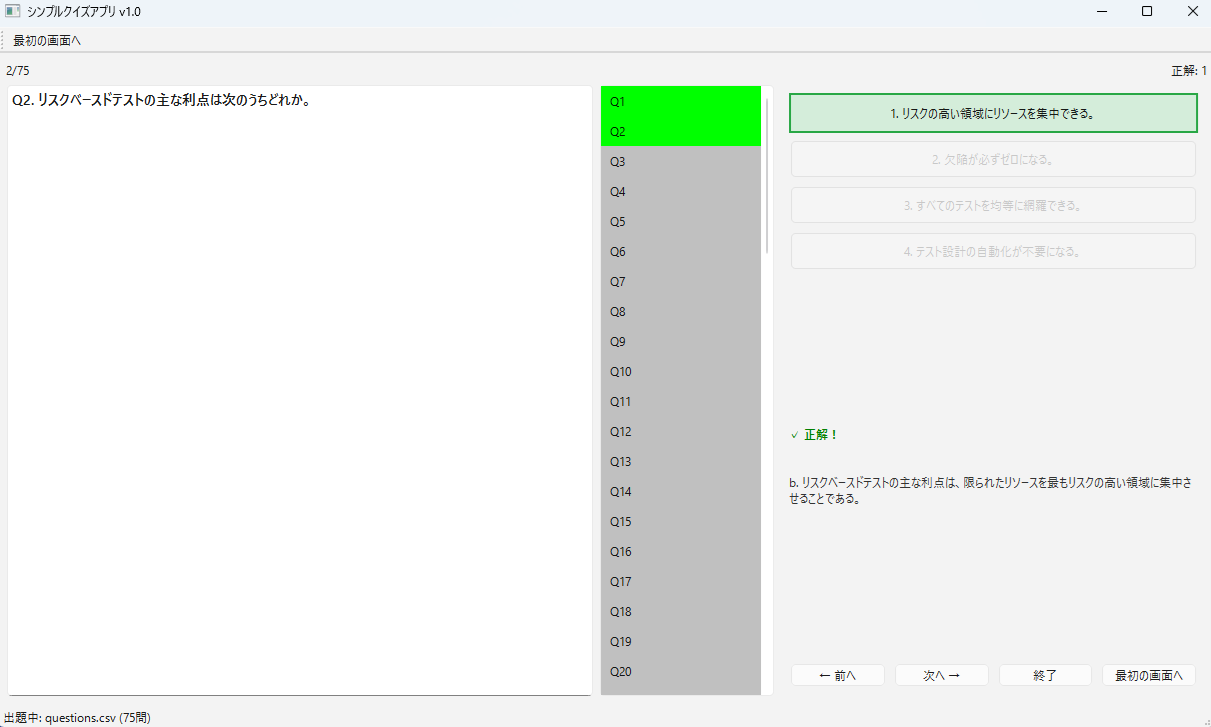
・三分割レイアウト: 問題文、ナビゲーション、回答エリアを1画面に収め、視線の移動を最小化。
・キーボード操作: 数字キーで回答し、Enterで次へ。マウス操作の摩擦を極限まで排除。
4. ステップ3:実行ファイル(exe)の作成
作成したアプリを、ダブルクリックですぐに動かせるように変換します。
ビルドコマンド:
pyinstaller --noconfirm --onefile --windowed --name QuizApp_slim --collect-all PySide6 app.py確実に起動させるための配置
ビルド後、dist フォルダに生成された QuizApp_slim.exe と同じ場所に questions.csv を配置してください。これだけで準備完了です。
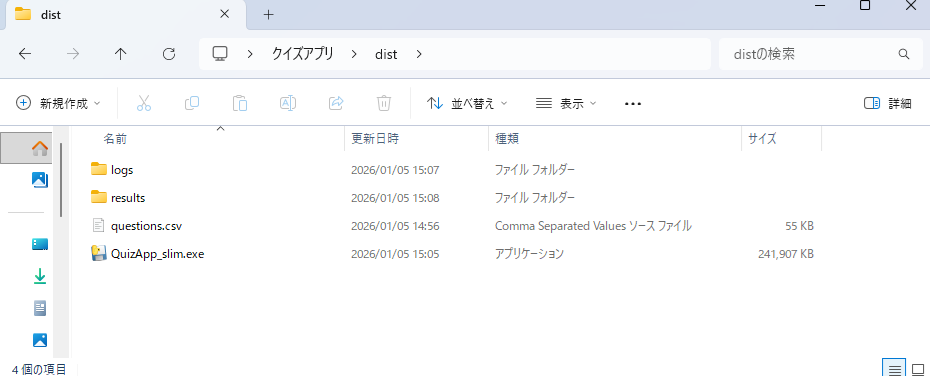
また、exeファイルの初回実行時には「logs」や「results」といった結果保存用のフォルダが自動的に作られます。そのため、初回実行のみ、やや起動が遅くなりますが異常ではありません。
5. まとめ:「制約」こそがテストエンジニアを育てる
JSTQBの「テストマネジメント」の本質は、制約下での最適化と改善です。「教材がない」という制約を、エンジニアリングで解決するプロセスそのものが、合格に必要なマインドセットとその後のキャリアを高めてくれます。
「PCを開いたら、まず1問」。この小さな仕組みがその後の長い道のりをサポートしてくれるはずです。
<過去の記事>
JSTQB AL テストマネージャ(TM)試験 合格体験記 ─ 多忙な社会人のための勉強法ー